Use W/S for throttle, braking and reverse; A/D or the arrow keys to steer; and Space for the handbrake. J operates the wipers. In a run, R returns to the last checkpoint and holding Backspace returns to the start box.
PC keyboard only. This reference lists visible tutorial and HUD bindings from reviewed footage. It does not translate keyboard controls into unverified mobile or controller bindings.
On this page
- Confirmed PC keyboard reference
- Co-driver call buttons
- A short input check before chasing a time
- Reverse and recover with the right action
- Handbrake and corner practice
- Practise a drift without changing everything at once
- Wipers, gearing and handling settings
- Check your role, screen and platform
- Related guides
- Sources & verification
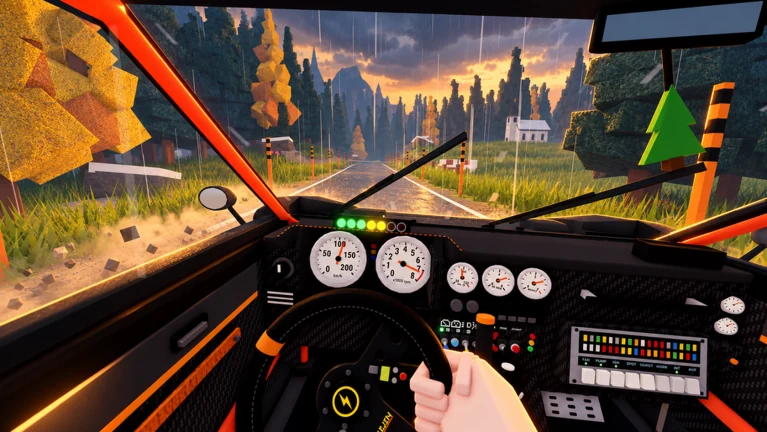
Confirmed PC keyboard reference
The main reference is Settings → Controls → Keyboard at 10:00 in the ItzVexo recording. Check your current Settings screen if a binding differs.
| Context | Input | Action |
|---|---|---|
| Driving | W / S | Throttle / brake; keep holding S after stopping to reverse |
| Driving | A / D or arrow keys | Steer |
| Driving | Space | Handbrake |
| Inside the car | J | Wipers |
| Inside the car | Hold K | Washer |
| Driving | M | Toggle manual gears |
| Manual gears enabled | E / Q | Shift up / down |
| Driving | N | Toggle simulation / arcade handling |
| In a race | R | Return to the last checkpoint |
| Outside a race | R | Put the car back on the road |
| Driving | Hold Backspace | Return to the start box |
| In the start box / at the finish | Enter | Start / retry |
| Outside a run | B | Main menu |
| Inside the car | F; hold during a race | Leave the car; leaving during a race ends the run |
| Play menu | Enter / Backspace | Choose / go back |
Co-driver call buttons
These bindings are for the co-driver role in the recorded keyboard settings. Space has a different function here than it does for the driver.
| Input | Co-driver call |
|---|---|
| 1 / 2 / 3 | Hard left / left / slight left |
| 4 / 5 / 6 | Slight right / right / hard right |
| C | Jump |
| Space | Danger |
A short input check before chasing a time
Use this as a practice exercise once you are in the driver’s seat. The bindings are observed in the source recording; the order below is our suggestion for learning them.
- 01
Learn braking and reverse as one sequence.
Use W to move, then S to slow and stop. Keep holding S after the stop to reverse. Notice that a car still travelling forward can first be braking when you press S; the reverse lesson explicitly asks you to continue holding it.
- 02
Make steering predictable.
Use A/D or the arrow keys and watch how much direction change you create. On an unfamiliar corner, slow before asking for a large change in direction. Change your approach gradually instead of combining maximum steering and a new handbrake technique at once.
- 03
Keep a recovery decision ready.
When you become stuck, decide whether you want the last checkpoint or the start box before reaching for a key. R and held Backspace serve different purposes, while held F ends a run by leaving the car.
Reverse and recover with the right action
- 01
Stop before reversing.
For the recorded tutorial, hold S until the car stops, then keep holding it to reverse. Follow any input instruction displayed by your current client.
- 02
Use the last checkpoint for a local recovery.
The HUD labels R as Last checkpoint. Check the car and route after recovery before accelerating again.
- 03
Restart when you want a new attempt.
Hold Backspace when the driving HUD shows the restart action. This returns to the start box, rather than simply recovering at a checkpoint.

Handbrake and corner practice
Space is the handbrake. At 03:55 in the reviewed CHALLS recording, the tutorial connects the handbrake with turning into a drift. Practise at a manageable speed on a familiar corner: turn in, follow the tutorial’s handbrake instruction, then assess whether you kept the car on line. This is not evidence that drifting every corner is fastest.
Practise a drift without changing everything at once
- 01
Learn the corner without the handbrake first.
Pick a corner you can recognise on a repeat attempt. Approach at a manageable speed and try to finish the turn with the car under control. This provides a baseline for judging the next attempt.
- 02
Follow the tutorial’s turn-in instruction.
Use Space for the handbrake as shown in the drift lesson. Focus on where the car points and whether you can continue along the route. The useful outcome is control, rather than creating the largest possible slide.
- 03
Review one cause after the attempt.
If you overshoot or spin, try a slower approach before changing the car setup. If the turn is clean, repeat it to see whether it is consistent. A single spectacular slide does not show that the technique improved the stage time.
Wipers, gearing and handling settings
J operates the wipers; hold K for the washer. Identify those keys before a session so you can use them without searching through menus when visibility is distracting. These bindings do not tell us an exact weather schedule or quantify the effect of rain on grip.
The recorded keyboard page also lists M for manual gears on/off, E/Q for shifting up/down in manual mode, and N for simulation/arcade handling. If the car feels different between attempts, inspect these settings before blaming a vehicle change. For a fair practice comparison, keep the selected gearing and handling mode consistent. This guide does not prescribe one as the universally fastest option.
Check your role, screen and platform
J is the recorded wiper binding, and holding K operates the washer. Driving, menus and the co-driver seat use different inputs: C, for example, is the co-driver’s Jump call in the settings shown here. Mobile and gamepad layouts have not been verified for this guide.
Backspace behaves differently in a menu.
A menu shows Backspace as Back; the driving HUD shows a held Backspace as Restart. Look at the current context before pressing it.
You left the car by accident.
The recorded HUD explicitly warns that holding F to exit ends the run. Use the recovery controls when you intend to continue driving.
Sources & verification
Sources reviewed . A recorded interface is evidence of that version, not a claim of a live playtest.
- Gameplay videoCHALLS — Backseat Rally gameplay, October 20, 2026
Reviewed recorded PC gameplay, including menu, garage, co-driver, tutorial and driving HUD footage. This is a review of a recording, not a claim that this site tested the current Roblox client. Interfaces can change.
- Gameplay videoItzVexo — recorded keyboard controls (10:00)
Reviewed Settings → Controls → Keyboard at 10:00. Bindings are observations from a recording, not a live-client test. Also checked the Pine Forest start panel at 01:16.